CANVA TEMPLATE
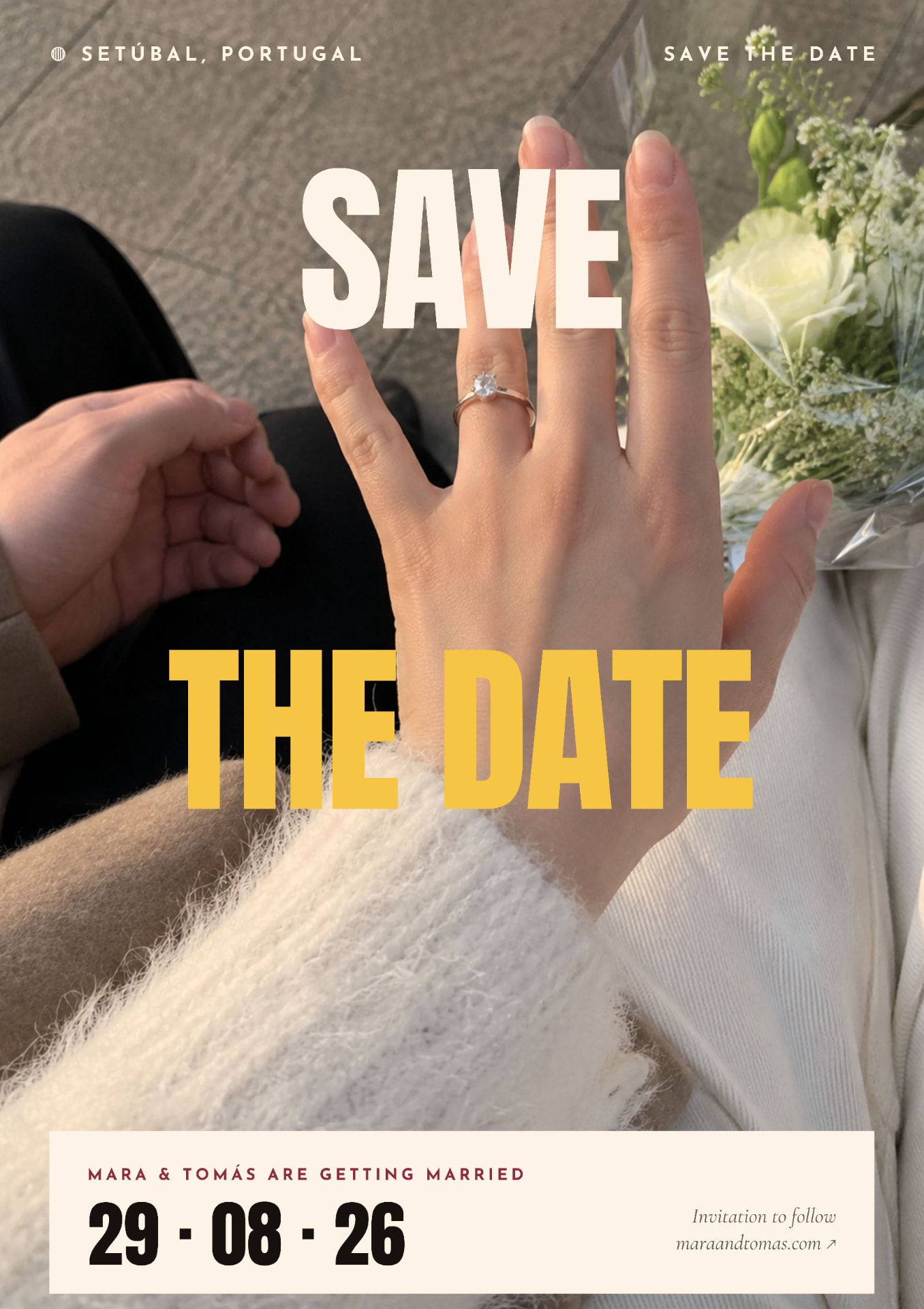
Mara & Tomás Editorial Wedding Weekend Canva Template
EDITABLE WEDDING STATIONERY TEMPLATES FOR CANVA
Three editable Canva wedding designs for your Save the Date, wedding details and full weekend itinerary. Change the photo, names, dates, colours, wording and page size to suit your wedding.
€4
One-off payment. Instant digital access — no physical stationery is shipped.
ABOUT THIS TEMPLATE
A bold, photo-led wedding weekend stationery set for couples who want something less traditional. The three coordinated Canva designs cover the announcement, essential wedding details and the full weekend itinerary in one strong editorial style. Replace the sample photograph, names, dates, locations, timings and wording with your own, adjust the colours and typography, then resize the pages to suit how you plan to print or share them. Designed for destination weddings, wedding weekends and couples who want their stationery to feel closer to an editorial spread than a traditional invitation. Ideal for destination weddings, wedding weekends, modern and editorial wedding styling, photo-led stationery, digital Save the Dates, wedding weekend information cards, sharing on a wedding website, and wedding signs after resizing.
WHAT YOU GET
- — 3 coordinated Canva wedding stationery designs
- — Save the Date template
- — Wedding Weekend / Details template
- — Full Weekend Itinerary template
- — Editable text
- — Editable names and dates
- — Editable locations and timings
- — Replaceable background photography
- — Editable colours
- — Editable typography where supported by Canva
- — Editable schedule and wedding information
- — Ability to adapt the design dimensions for your preferred use
- — Instant digital access after verified payment
- — 3 editable designs in Canva
WHAT YOU CAN EDIT
- — Names
- — Wedding date
- — Location
- — Venue
- — Ceremony details
- — Dinner / reception details
- — Accommodation
- — RSVP information
- — Website
- — Weekend schedule
- — Dress information
- — Transport information
- — Background photograph
- — Colours
- — Text
- — Typography
- — Page size / final format
SIZE & PRINTING
ORIGINAL TEMPLATE SIZE — the supplied master design is A1 portrait: 594 × 841 mm / 23.4 × 33.1 in. All three pages use this original master size. The layout is fully editable in Canva, so you can adapt the design to the dimensions that suit your wedding — for example an invitation, digital announcement, printed information card, poster or wedding sign. Because changing the proportions of a design may alter spacing, photography and text placement, always review the layout carefully after resizing. Some Canva one-click resizing features may require Canva Pro. If your Canva plan does not include automatic resizing, you can create a new Canva design at your preferred custom size and copy or adapt the template elements into it.
RESIZING THE TEMPLATE — this design is supplied at A1 portrait size (594 × 841 mm). You are welcome to adapt the design to a different size for your own wedding. Changing a page's dimensions or aspect ratio can affect line breaks, text sizing, spacing, image crops, alignment and margins. Always review the design after resizing and order a proof before placing a large print order. Some automatic Canva resizing features may require Canva Pro.
HOW TO USE IT
- BUY THE COLLECTION — Purchase securely through Side Street Weddings
- OPEN IN CANVA — After payment, access your private Canva template link.
- MAKE IT YOURS — Replace the sample wedding information and customise the permitted design elements.
- DOWNLOAD — Export your finished stationery from Canva.
- PRINT OR SHARE — Print your finished stationery or export appropriate items for digital sharing.
1. Purchase — complete payment securely. 2. Open in Canva — your private Canva template link unlocks after verified payment. 3. Make it yours — replace the sample names, dates, locations, photograph and wording. 4. Choose your size — keep the supplied A1 portrait dimensions or adapt the pages to another format. 5. Check the layout — after resizing, review your typography, spacing, photo crop and margins. 6. Download — export from Canva using the file type appropriate for your intended use.
LICENCE
ONE PURCHASER / ONE WEDDING
YOU MAY
- — Edit and resize the templates for your own wedding
- — Print reasonable quantities for that event
- — Share final exported PDF, JPG or PNG files with your printer, venue or wedding planner for that wedding
- — Send your finished stationery to your guests
YOU MAY NOT
- — Share the Canva template link or the editable Canva source
- — Resell, sublicense, redistribute or gift the templates
- — Commercially exploit them or use them for client work
- — Use them for more than one wedding
- — Create competing template products from them
CANVA INFORMATION
A free Canva account is sufficient for standard editing. Some Canva features or assets may require Canva Pro.
Templates can be resized where needed. Canva Pro provides Resize tools; free Canva users can create a new custom-size design and transfer their content manually. Full instructions are included in your Start Here guide.
DIGITAL PRODUCT
No physical stationery is shipped. Your purchase provides access to editable Canva templates and the accompanying Start Here guide.
All sales are final. Because this is instant digital content, we do not offer refunds once the templates or access guide have been accessed.
Canva is a third-party service. Side Street Weddings is not affiliated with or endorsed by Canva. Features, pricing and availability may vary by Canva plan, and some assets or features may require Canva Pro.