CANVA TEMPLATE
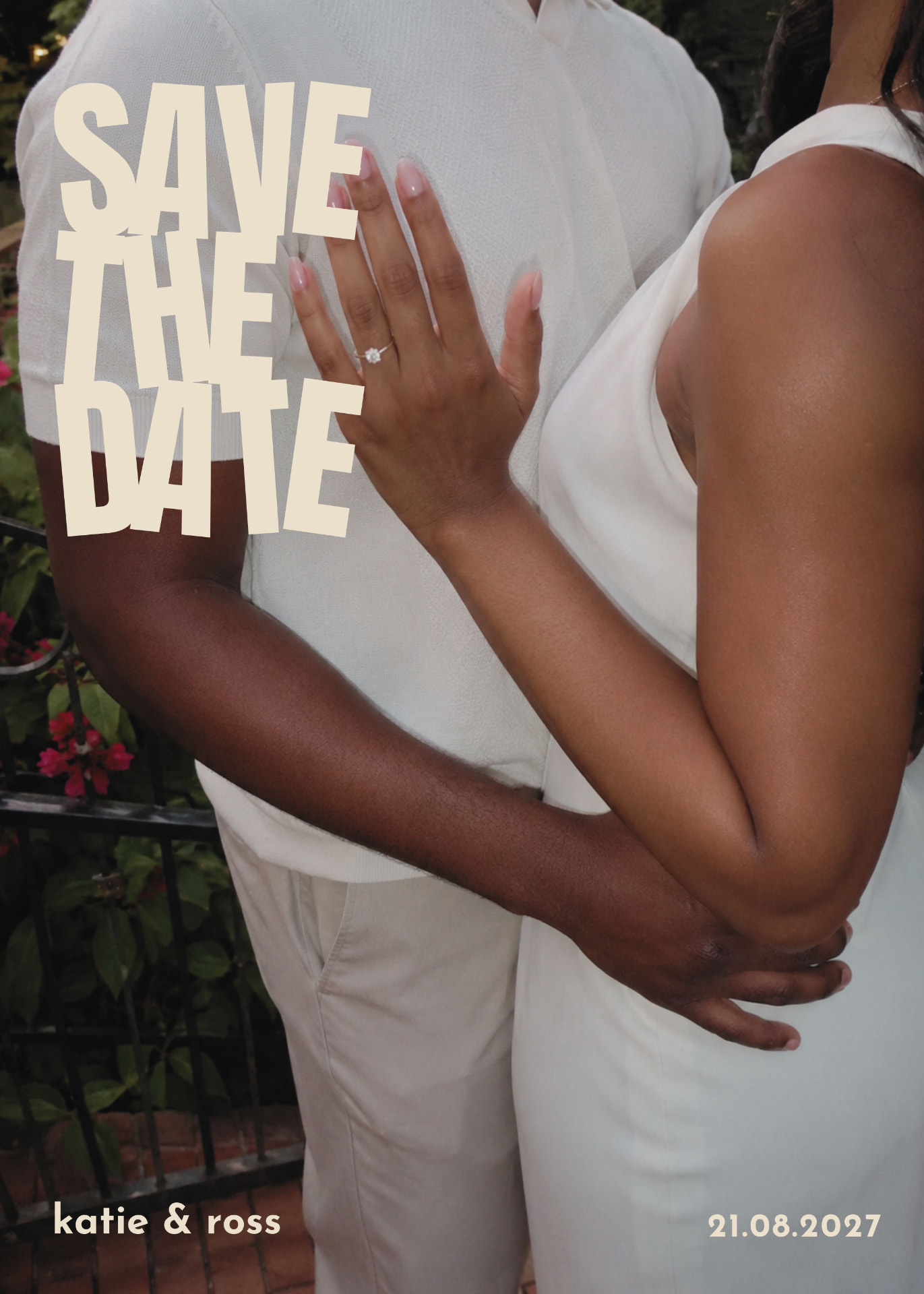
Photo Save the Date Canva Template
EDITABLE WEDDING STATIONERY TEMPLATES FOR CANVA
One editable photo save the date. Add your picture, names and date, then download and send.
€2
One-off payment. Instant digital access — no physical stationery is shipped.
ABOUT THIS TEMPLATE
A single, bold photo save the date you edit yourself in Canva. Drop in your favourite engagement photo, type your names and your wedding date, and the oversized stacked lettering does the rest. Designed to work with almost any picture — portrait or landscape, phone photo or professional shoot. Print it or send it digitally to your guests. One template, one price, no design skills needed.
WHAT YOU GET
- — 1 photo save the date template
- — Start Here guide
- — 1 editable design in Canva
WHAT YOU CAN EDIT
- — Your own photo
- — Names
- — Wedding date
- — Text colour
- — Wording
SIZE & PRINTING
5 x 7 inches (127 x 178 mm), portrait
Print at 5 x 7 inches. Use the highest quality photo you have — around 1500 x 2100 pixels or larger keeps it sharp in print.
HOW TO USE IT
- BUY THE COLLECTION — Purchase securely through Side Street Weddings
- OPEN IN CANVA — After payment, access your private Canva template link.
- MAKE IT YOURS — Replace the sample wedding information and customise the permitted design elements.
- DOWNLOAD — Export your finished stationery from Canva.
- PRINT OR SHARE — Print your finished stationery or export appropriate items for digital sharing.
Open your Canva link, replace the sample photo with your own, type your names and date, then download as a print-ready PDF or a JPG for messaging.
LICENCE
ONE PURCHASER / ONE WEDDING
YOU MAY
- — Edit and resize the templates for your own wedding
- — Print reasonable quantities for that event
- — Share final exported PDF, JPG or PNG files with your printer, venue or wedding planner for that wedding
- — Send your finished stationery to your guests
YOU MAY NOT
- — Share the Canva template link or the editable Canva source
- — Resell, sublicense, redistribute or gift the templates
- — Commercially exploit them or use them for client work
- — Use them for more than one wedding
- — Create competing template products from them
CANVA INFORMATION
A free Canva account is sufficient for standard editing.
Templates can be resized where needed. Canva Pro provides Resize tools; free Canva users can create a new custom-size design and transfer their content manually. Full instructions are included in your Start Here guide.
DIGITAL PRODUCT
No physical stationery is shipped. Your purchase provides access to editable Canva templates and the accompanying Start Here guide.
All sales are final. Because this is instant digital content, we do not offer refunds once the templates or access guide have been accessed.
Canva is a third-party service. Side Street Weddings is not affiliated with or endorsed by Canva. Features, pricing and availability may vary by Canva plan, and some assets or features may require Canva Pro.