CANVA TEMPLATE
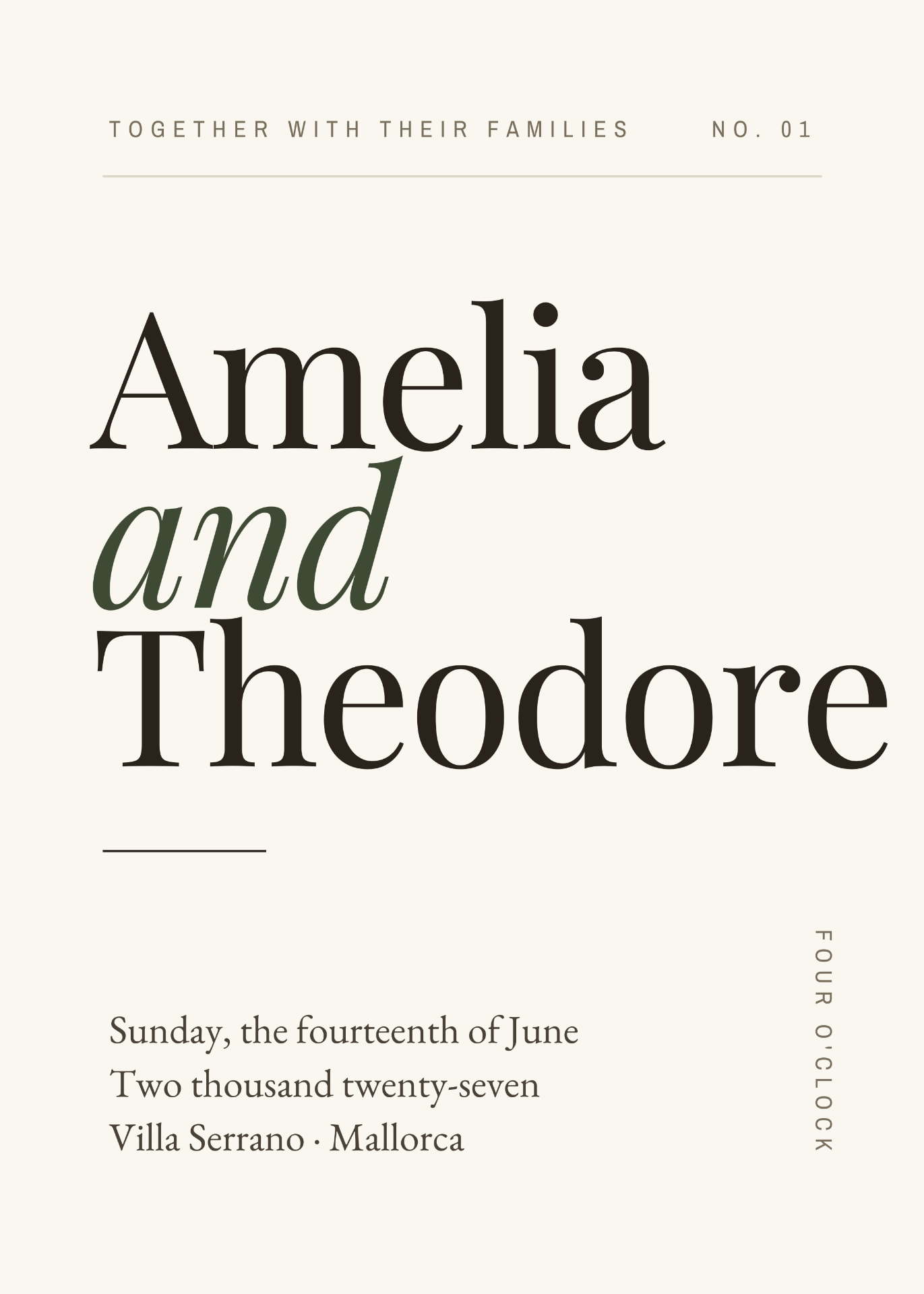
Serrano Editorial Wedding Stationery Suite
EDITABLE WEDDING STATIONERY TEMPLATES FOR CANVA
A complete editorial wedding stationery suite built around expressive serif typography, quiet spacing and a restrained Mediterranean palette. Personalise the entire collection in Canva, from invitations and day-of signage to seating, weekend stationery and wedding identity details.
€21
One-off payment. Instant digital access — no physical stationery is shipped.
ABOUT THIS TEMPLATE
ABOUT SERRANO Serrano is a typography-led wedding stationery collection for couples who want their entire wedding to feel visually connected. The collection combines oversized serif type, fine structural rules, generous negative space and a restrained palette of ivory, stone, olive and espresso. Rather than stopping at the invitation, Serrano carries the same design language across the ceremony, reception, table stationery, signage, wedding weekend and supporting identity pieces. Everything is supplied as editable Canva templates so you can replace the sample wedding information, adjust the permitted design elements and build a consistent wedding identity yourself. FROM INVITATION TO LAST DRINK. One visual identity across your paper suite, ceremony, tables, signage and wedding weekend.
WHAT YOU GET
- — Save the Date — 5 x 7 in
- — Invitation — 5 x 7 in
- — RSVP card — 3.5 x 5 in
- — Details card — 4 x 6 in
- — Alternative invitation directions (boutique hotel, architectural)
- — Order of Service
- — Wedding Menu
- — Wedding Day Timeline
- — Thank You card
- — Wedding Website / QR card
- — Welcome Sign
- — Seating Chart
- — Signature Cocktails / bar sign
- — Unplugged Ceremony sign
- — In Loving Memory sign
- — Guest Book sign
- — Cards & Gifts sign
- — Reserved sign
- — Late Night Snacks sign
- — Table Number
- — Place card with meal choice
- — Escort / guest table card
- — Wedding Weekend Itinerary
- — Morning After / brunch card
- — Welcome note / weekend information
- — Monograms, name lockups, decorative marks and patterns
- — Colour, spacing and typography style guide
- — 24 editable designs in Canva
WHAT YOU CAN EDIT
- — Names
- — Dates and times
- — Wording
- — Venues
- — RSVP information
- — Menu content
- — Timeline content
- — Guest names
- — Table numbers
- — Seating information
- — Drinks
- — Weekend plans
- — Website and QR information
- — Monogram initials
- — Colours
- — Typography where appropriate
- — Text placement where appropriate
SIZE & PRINTING
Core paper pieces are supplied at US sizes: Save the Date 5 x 7 in, Invitation 5 x 7 in, RSVP 3.5 x 5 in, Details card 4 x 6 in. Signage, table and weekend pieces are supplied at the size used in the Canva collection. Confirm every finished size in Canva before ordering prints.
Download your finished designs from Canva using the format requested by your printer. For professional printing, confirm dimensions, bleed, colour requirements and file format with your chosen printer before ordering. Print one proof before placing a full stationery order.
HOW TO USE IT
- BUY THE COLLECTION — Purchase securely through Side Street Weddings
- OPEN IN CANVA — After payment, access your private Canva template link.
- MAKE IT YOURS — Replace the sample wedding information and customise the permitted design elements.
- DOWNLOAD — Export your finished stationery from Canva.
- PRINT OR SHARE — Print your finished stationery or export appropriate items for digital sharing.
Open your access link, let Canva create your own copy, then work through the named pages and replace the sample wedding information. Everything is built from editable text boxes rather than flattened artwork, so wording, rules, marks and colours can be adjusted while keeping the Serrano design system intact.
LICENCE
ONE PURCHASER / ONE WEDDING
YOU MAY
- — Edit and resize the templates for your own wedding
- — Print reasonable quantities for that event
- — Share final exported PDF, JPG or PNG files with your printer, venue or wedding planner for that wedding
- — Send your finished stationery to your guests
YOU MAY NOT
- — Share the Canva template link or the editable Canva source
- — Resell, sublicense, redistribute or gift the templates
- — Commercially exploit them or use them for client work
- — Use them for more than one wedding
- — Create competing template products from them
CANVA INFORMATION
A free Canva account is sufficient for standard editing. Some Canva features or assets may require Canva Pro.
Templates can be resized where needed. Canva Pro provides Resize tools; free Canva users can create a new custom-size design and transfer their content manually. Full instructions are included in your Start Here guide.
DIGITAL PRODUCT
No physical stationery is shipped. Your purchase provides access to editable Canva templates and the accompanying Start Here guide.
Because this is instant digital content, change-of-mind refunds are generally not offered once the templates or access guide have been accessed. This does not exclude any right required by applicable consumer law, including where digital content is faulty or not as described.
Canva is a third-party service. Side Street Weddings is not affiliated with or endorsed by Canva. Features, pricing and availability may vary by Canva plan, and some assets or features may require Canva Pro.